Hi together,
I got a question form one of our ARIS users.
Is it possible that we can format a connection like this ? I never saw this in ARIS bevor, the screenshot is made in visio.
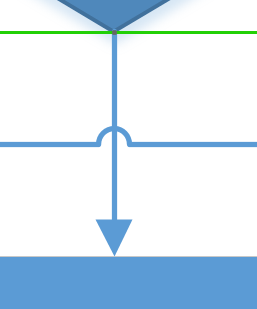
Does anyone have an idea?

Hi together,
I got a question form one of our ARIS users.
Is it possible that we can format a connection like this ? I never saw this in ARIS bevor, the screenshot is made in visio.
Does anyone have an idea?
Hi Frank,
thank you for the quick answer. Yes i know i can format the color, the arrow, the width etc.
Do you have a quick hint for me where exactly i can find this "bridge" setting ?
Thank you very much
Marius

Hi Marius,
as I already wrote ;-)
This is a property of the model. You just open the properties of the specific model and have a look at the "connections" section.
Bye,
Frank
Hello Frank Weyand
I have the same question, as Marius
I cannot find this "bridge" setting in Aris Architect
Could you please more specific or attach a screenshot?
Thanks
OK, I've juste found the settings In Aris Connect Designer (but not yet in Aris Architect)
Model / Click "Connection Properties" icon on the toolbar
In the popup window set Bridge height to 20 for example

Hi,
as I said, this is a model property... so the property dialog of a model is the place to look for. Context menu on the model -> Format -> Connections.
This model property is set to the model when it is created. So if you want to specify this property for new models, you need to have a look at the options. Click the "ARIS" application button -> Options -> Model -> for new models -> connections.
Found it?
Bye,
Frank
Frank Weyand on
Hi,
yes, sure, you can change the color, width and arrow on source and target object in the properties of the connection.
The "bridge" of the connection is a property of the model and effects all connections in the model.
Bye,
Frank