
Hello everyone, I am currently modeling in ARIS Cloud Designer and I have two questions regarding the end‑user perspective:
- Switching views: Is there a way to look at the current model in the end‑user view (Connect/Consumer View) without publishing it – so I can preview how it will appear to readers?
- External links: How can I attach an external link (e.g. a Moodle assignment link) directly to a task or data object so that it is visibly displayed and clickable for end users? → The goal is that the link is not only stored in the attribute window but also clearly visible in the diagram itself (for example as an icon, symbol, or tooltip).
I would appreciate any best practices or concrete tips on how to achieve this – screenshots or examples would be very welcome.
Best regards, Harald

Klemens Hauk on
Hello Harald,
Ad1: I am not sure I understand your request. What do you mean by Connect/Consumer view? Do you mean the "published content"? This is available if the Publication mode is set by the Administrator. There is no difference between a published diagram compared to the diagram you see in the modeler.
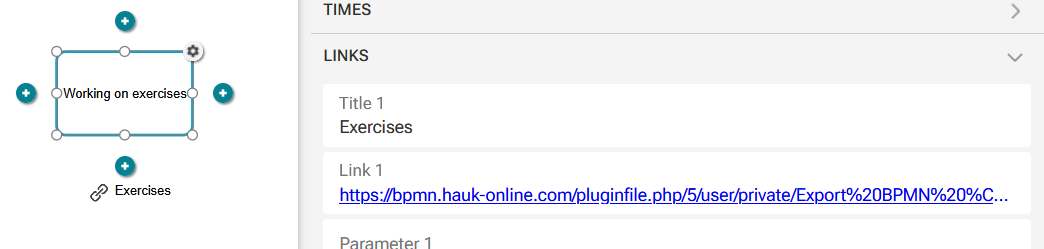
Ad2: Aris is delivered with a set of attributes.There is an attribute group named "Links". There you can define various links e.g. a URL. You have always several attributes, the link itself and a title. You can define these links on model level or on object level. If you place the attribute in the diagram the title is displayed with the "chain" icon and the user can double-click on it.
The functionality in the published content is the same. Viewers see the title with the chain icon and can click on it (it's a single-click not a double-click, that's a small difference.)
If the "Links" attribute group is not available in your environment, it is hidden by customization (you can try "Add attributes").
Pls. correct me, if I misunderstood your requests.
Regards
Klemens