

Good afternoon,
I need help with a question related to configuring a Dashboard created with ARCM and CONNECT.
The ARIS version is 10.0.5.1243292, so we are talking about the new ARIS AWARE component.
The Dashboard, created in ARIS Connect, consists of a Data Feed that is represented by several types of information: ARCM links (information from risk assessments, tests to controls, approval workflow ...) + documents ( Connect repository) + among others. After developing Dashboard the view/ edit privileges have been assigned and at this point the set user group can see the Dashboard in the Connect> Repository (where it was created).
But in addition to where it was created (Connect> Repository> Dashboard), the Dashboard should be configured and made available in ARCM and Connect.
Image 1 - Where Dashboard + Data Feed was created (Connect)
.png)
Where I wanted to make the Dashboard available, but nothing appears (Connect - Image 2) and an error appears (ARCM - Image 3).
.png)
.png)
In relation to Image 2:
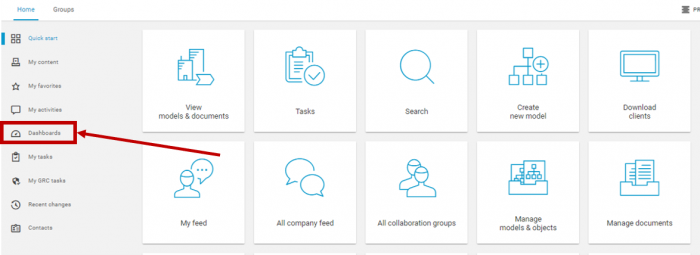
I think, automatically, the Dashboard should appear here, but nothing happens when you click in "Dashboard" in Connect > Home.
In relation to Image 3:
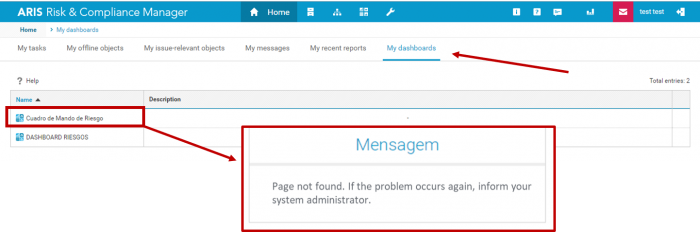
In ARCM, we have "My Dashboard" tab and, for the Dashboard to appear on this screen, it is necessary to configure the connection in the part of Admin> Integration> Dashboard (Image 4).
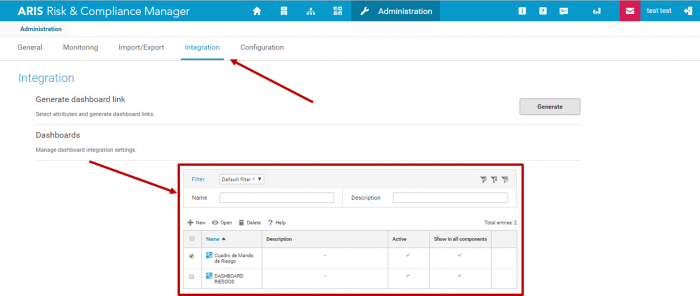
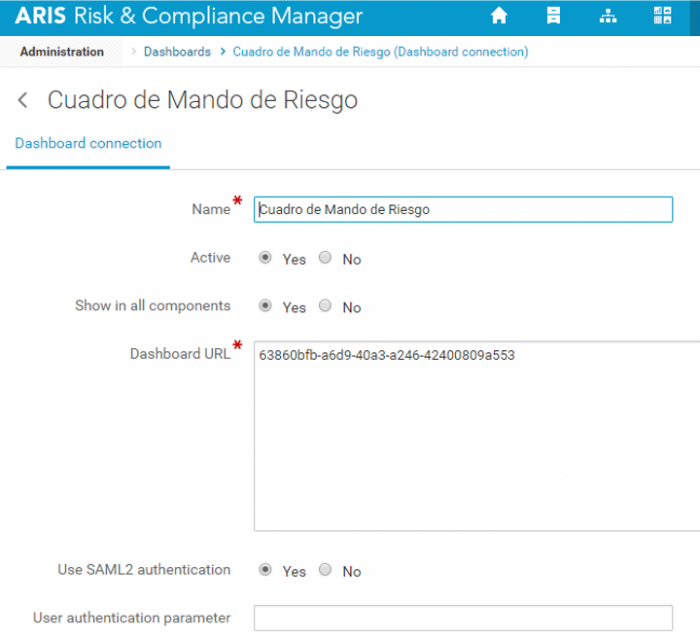
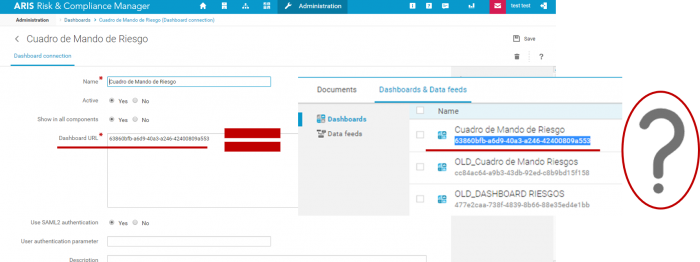
And I've already done the setup of 2 Dashboards, but none works. For setup a Dashboard, I had filled all the attributes (Image 5), including the Dashboard URL, but I do not know if I put the correct link? (Image 6).
After that, although the Dashboards appear in the ARCM > Home > "My Dashboard" tab, an error appears when we try to enter (Image 3).
.png)
How to put these two situations working?
I really appreciate your attention and all your help.
Best regards,
Ana Rita Lopes
.PNG)
.PNG)
.PNG)
Steffen Exeler on
Dear Ana Rita,
so many questions... But a first thing I can see is that you put the GUID of the dashboard where the URL needs to be.
When you have the dashboard in a browser tab in Connect (after clicking on the dashboard link in the repository it opens), just copy the whole URL from the browser and paste it into the field in ARCM.
That should work then.
Besides, of course, the user needs to have all the necessary privileges for the dashboard and for the data.
Kind regards
Steffen