
back to: ONE Standard - PCF® QuickStart
Table of Content
- Prerequisities
- Install ONE Standard - PCF® QuickStart via ARIS Gallery
- Database renaming and publication
Prerequisites
The PCF® QuickStart is based on the ONE Standard methodology. So, the ONE Standard – Foundation must be available. There are two options to install this Accelerator
(The PCF® QuickStart database is used instead of the default PROJECT TEMPLATE database provided by the ONE Standard – Foundation.)
Install ONE Standard - PCF® QuickStart via ARIS Gallery
- Open the ARIS Gallery in your project room
- Go to BPA > Getting Started Framework and click the ONE Standard - PCF® QuickStart
- Press Install
Database renaming and publication
- Go to ARIS Administration and navigate to Databases
- Select the PCF database and rename it according to your project or initiative.
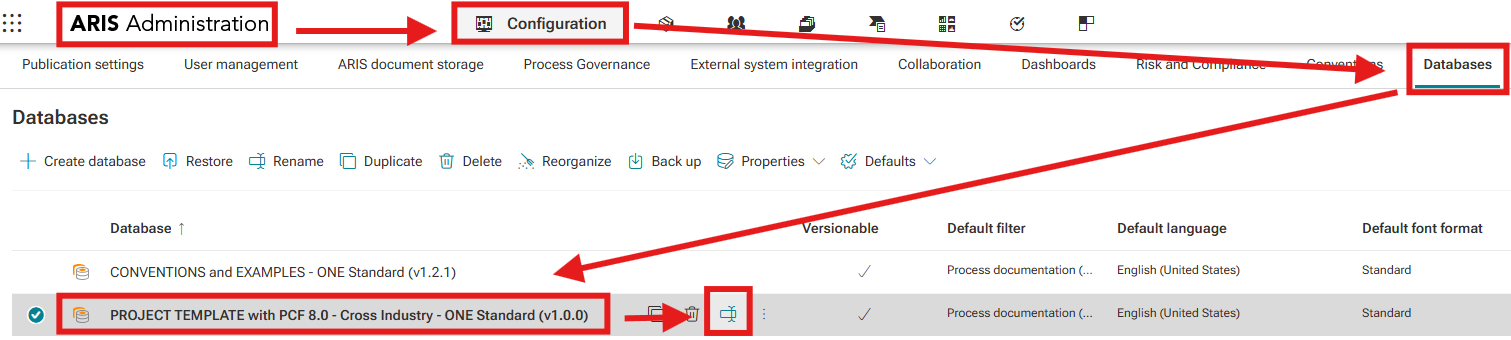
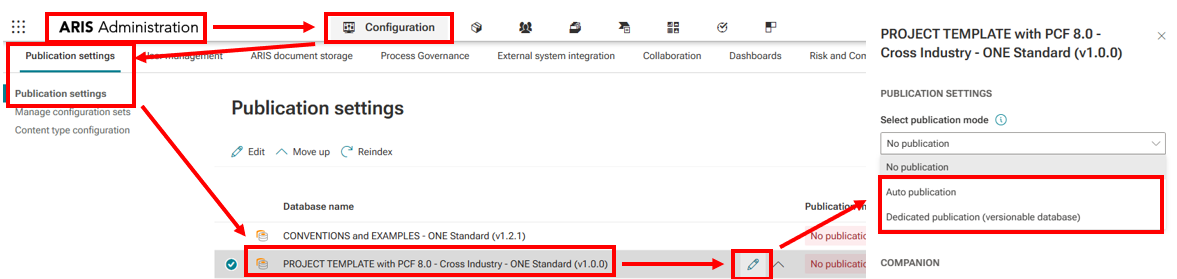
- Afterwards open Publication Settings.
- For your Project Template Database (your future process repository), choose the appropriate publication option:
- During the initial setup phase: Auto Publication is sufficient.
- Once moved into production: switch to Dedicated Publication.
- For your Project Template Database (your future process repository), choose the appropriate publication option:
Need Help?
If you have questions about any Accelerator or want to exchange experiences with others, visit our community forum. There you can ask questions, share insights, and support each other.