

In our previous post, Bring your own LLM: ARIS AI now runs on-prem, we showed why connecting your own LLMs to ARIS matters. Now let’s look at how it works. Setting up Bring your own LLM takes just a few steps.
Configure everything in one place: ARIS Administration > Configuration > AI Companion. An AI Companion license and a user with the Companion admin function privilege are required. Setup involves three steps:
- Add your AI providers. Enter the endpoint and credentials for each provider and test the connection directly in the UI.

2. Add your AI models. Choose which of the provider’s AI models ARIS should use. If the provider supports model discovery, you pick from a list; otherwise, you enter the AI model ID. ARIS recognizes well-known models and pre-fills their properties, such as image input, function calling and context window size. You can adjust these properties to match your hosting setup.

All added AI models appear in an overview that shows their type, provider, capabilities and connection status, as in the example below.

3. Map AI models to AI features. Assign an AI model to each ARIS AI feature or simply set a default chat and embedding AI model that the respective AI features use. ARIS shows what each feature requires and warns you if a selected model does not meet those requirements.
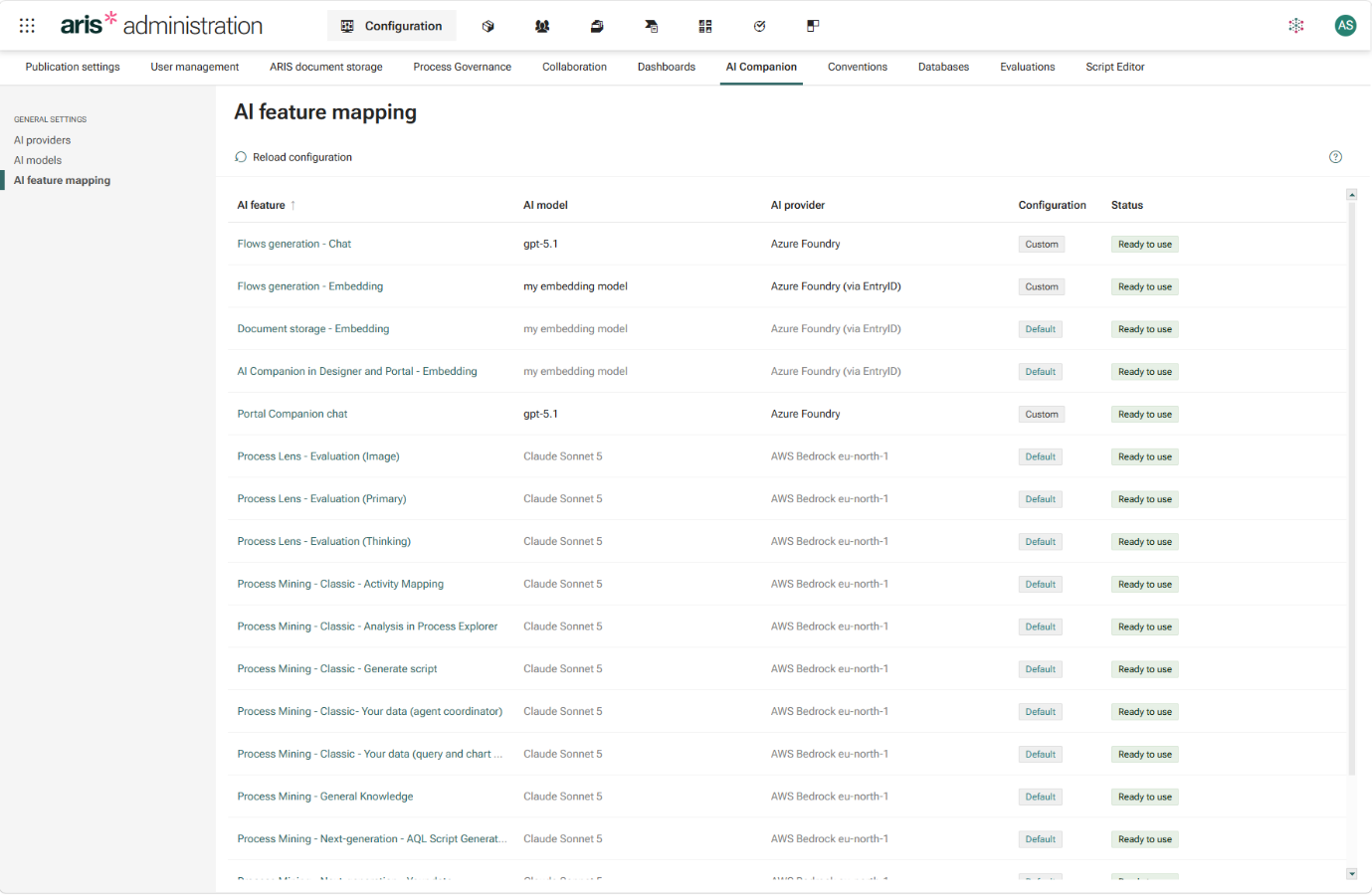
Finally, enable the AI Companion for your database and grant users the Companion user function privilege. That’s it. Now you’re ready to use ARIS’ AI features on-prem. The ARIS documentation walks through every step in detail.
A word on result quality
There is one important difference from SaaS environments that we want to be transparent about: the quality of the AI results depends on the LLM(s) you connect.
In ARIS SaaS, ARIS selected well-suited AI models for each AI feature. With Bring your own LLM, that choice is yours. ARIS AI features do much more than send a single prompt. Model generation, for example, first plans the process, then uses tools to add roles, IT systems and risks etc., reuses existing objects from your repository, and reads uploaded documents and images. Tasks like this place real demands on an LLM: reliable function calling, structured output, image understanding, a large context window and solid reasoning. Today’s top-tier models handle this well. Smaller or older LLMs may produce weaker results or sometimes no usable results at all.
What this means in practice:
- Match the AI model to the task. Because AI models are mapped per feature, you can reserve your strongest LLM for demanding features such as model generation and use other LLMs where they perform well.
- Test other AI models. You can connect any AI model whose API ARIS supports. However, ARIS cannot guarantee that every AI feature works with non-recommended models or delivers adequate quality.
- Test with your own content. Before rolling out to all users, try the AI features with typical documents, analyses and questions from your organization.
Get started and share your experience
Bring your own LLM is available for ARIS on-prem with version 10.0.2026.10. Download the release from the ARIS Download Center and see the ARIS documentation for all the setup details.
We would love to hear which models you connect and how the ARIS AI features perform in your environment. Your feedback helps shape our roadmap. Share your experience in the ARIS Community or reach out to your account team.
If you’re interested in the ARIS AI Companion also check the blog posts about


Alexander Cherednichenko on