
v1.x.y
Modeling Conventions and Guidelines (Pages)
- General Modeling Conventions, Guidelines, and Fundamentals
- Process Architecture & Process Modeling
- Library Modeling
- Application library - Modeling conventions (jump to section)
- Business object library - Modeling conventions (jump to section)
- Document library - Modeling conventions (jump to section)
- Metrics library - Modeling conventions (jump to section)
- Risk library - Modeling conventions (jump to section)
- Role library - Modeling conventions (jump to section)
- Organizational structure - Modeling conventions (jump to section)
- Group and Assignment structure
- Semantic Checks
Modeling Principles for Library Models
These are the general conventions for creating and linking models within the ARIS project database.
Library setup
It is recommended to set up the Library Models at the very beginning of a project — before starting to model the process architecture or any BPMN-based process models.
The library serves as the foundation for all reusable business artifacts represented as Library Objects that will later be re-used within the process models.
The setup and maintenance of library models are also closely linked to organizational responsibilities, as each library domain and its artifacts should have a clearly defined Person Responsible for their ongoing governance and quality assurance.
Person Responsible of Library Models
The Person Responsible attribute must be maintained for all Library models, whether part of the process architecture or the library. It defines the organizational ownership for maintaining and governing the respective model.
Re-use of Library Objects (via Occurrence copies)
Library objects are designed for re-use across multiple models and must be inserted as occurrence copies of their maintained definition objects from the corresponding Library Models.
All changes to library content are under the responsibility of the Library Owner.
However, process modelers may adjust certain attributes when necessary.
It is essential that such modifications are properly regulated and communicated to ensure alignment between process models and library content.
Final approval for publication can only be granted by the Library Owner.
Working with the libraries — In practice
In practice, the list of Library Models — and the content within them — continuously evolves in close alignment with the process architecture and process modeling activities.
Modelers will often identify missing elements during the creation of process models, which then need to be added to the respective library models. The degree of change depends on the type of artifact:
for example, Applications tend to remain relatively stable and require fewer updates, while Business objects are typically identified or refined during process modeling and must then be integrated into the corresponding library models.
The Library Models contain the core business artifacts that are designed for reuse throughout the process architecture modeling and should be treated as master data within the Process Repository.
Within this CONVENTION and EXAMPLES - ONE Standard database, each Library Model type is described individually under the Library group.
The corresponding subfolders provide dedicated modeling conventions and detailed guidelines for maintaining and linking each type of artifact.
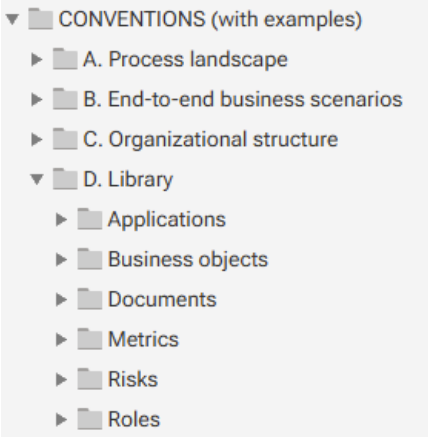
Library group structure
This is explained here:
Semantic Check
For all models, a dedicated semantic check named “Model and Convention Validation (ONE Standard)” is available.
This Semantic Check covers also Library Models.
Modelers are required to execute this check to verify compliance with all defined conventions and modeling rules. The semantic check validates the correct maintenance of relevant attributes, the structural integrity of models, and the proper placement of all elements within the database. This SemCheck support also the Library Model Owners.
Application library - Modeling conventions
Definition
The "Application Library" model provides a structured overview of the IT applications used within an organization. It serves as a central inventory to create, document, classify, and manage applications across business domains.
This model type is typically used to:
- Manage the creation and ownership of application objects that are reused in process models.
- Maintain transparency over the application landscape.
The libray model can be created manually or imported via interfaces from external systems such as IT asset management tools or CMDBs, ensuring data consistency and reducing maintenance effort.
Please note: The Application Library is not intended for Enterprise Architecture purposes, but rather to support structured and governed item maintenance with clear ownership and responsibility.
USED MODEL TYPE:
- Application system type diagram
MODEL ATTRIBUTES (next to "Name"):
- Description
- Person Responsible
system maintained (read-only):
- Type: Application system type diagram
- Last change: [Timestamp]
- Last user: [User name]
- Creator: [User name]
- Time of generation: [Timestamp]
MODELING CONVENTIONS:
The Application Library model serves as the central entry point for managing the IT applications used within the organization. It is used to create, list, maintain, and ultimately approve the applications that will later be reused in BPMN process models.
Applications are modeled using Application System Type objects. To improve structure and clarity, these applications can be grouped under Application Domain objects, which represent logical or functional groupings (e.g., Finance, HR, Sales).
This model type supports:
- A controlled creation process for application objects.
- Centralized governance of application data before reuse in process modeling.
- Consistency across the repository by ensuring that only approved applications are used in BPMN models.
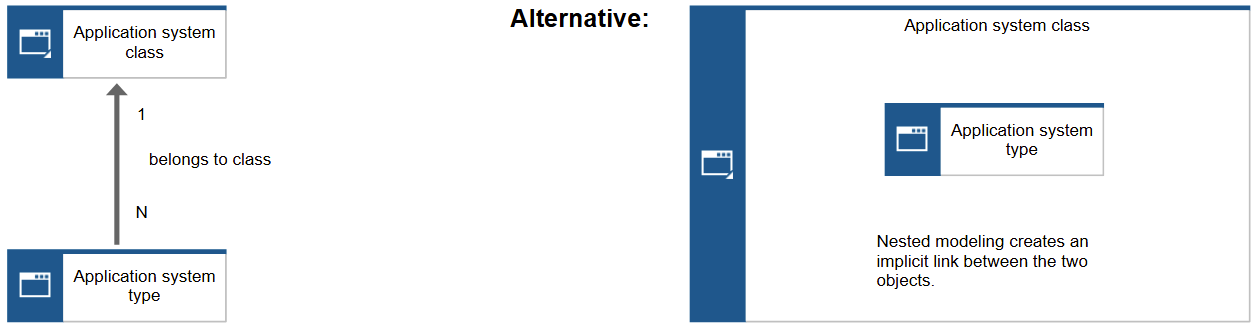
ASSIGNMENT CONVENTIONS:
- By default, the Application Library is modeled as a flat, single-level hierarchy without additional assignments.
- At a later stage, it may be beneficial to evolve this into a two-level structure
- Level 1: A model containing only Application Domain objects.
- Level 2: For each domain, a separate model of the same type lists the related Application System Type objects.
- In this case, it is recommended to introduce a dedicated group structure in the repository, where each Application Domain has its own group containing the respective catalog model.
OBJECTS/SYMBOLS CONVENTIONS:
 |
Application domain |
|
|
Object attributes (next to "Name"):
Assignments:
Occurrence copies:
|
Represents a domain or category of application system types within the Application Library. It serves as a container for organizing related application system types and facilitates reuse and standardization across models. | |
 |
Application |
|
|
Object attributes (next to "Name"):
Assignments:
Occurrence copies:
|
Represents a specific software system or technical implementation within an application domain. It defines the technical characteristics, interfaces, and capabilities of the system, and serves as a building block for modeling business processes and their IT support. | |
Business object library - Modeling conventions
Definition
The Business Object Library model serves as a centralized inventory for all Business Objects that are used across BPMN process models. It provides a structured and governed approach to create, document, and maintain domain-relevant data entities that carry business meaning—such as Invoice, Order, Customer, or Contract.
This catalog ensures:
- Consistency in naming and usage of Business Objects across all process models.
- Reusability through occurrence copies in BPMN models.
- Governance by assigning clear ownership and approval responsibilities.
Business Objects are represented using BPMN Data Objects, and this library model acts as the authoritative source for their definition and lifecycle.
In practice, process modelers frequently switch between their BPMN models and the Business Object library. While the need for new Business Objects often arises during process modeling, modelers should always check the library first to reuse existing objects wherever possible. This ensures semantic consistency and avoids redundant definitions.
USED MODEL TYPE:
- IE Data Model (original name)
MODEL ATTRIBUTES (next to "Name"):
- Description
- Person Responsible
system maintained (read-only):
- Type: IE Data Model
- Last change: [Timestamp]
- Last user: [User name]
- Creator: [User name]
- Time of generation: [Timestamp]
MODELING CONVENTIONS:
The BusinessObject Library is a dedicated diagram type that exclusively contains Business Objects. It serves as a central repository for defining, organizing, and maintaining all Business Objects used across processes. The library allows modeling of relationships between Business Objects, such as aggregation, composition, or other associations. Status information, lifecycle stages, or other relevant attributes of Business Objects can also be represented (e.g., draft, finalized, delivered).
Key Rules / Conventions:
- Only Business Objects are allowed in this model.
- All Business Objects used in process models must be included in the BusinessObject Library, either prior to or following their use in processes.
- Occurrence copies of Business Objects can be used in process diagrams, but the original definitions reside in the library.
- The library ensures a single source of truth for all Business Objects and supports consistent usage across process models.
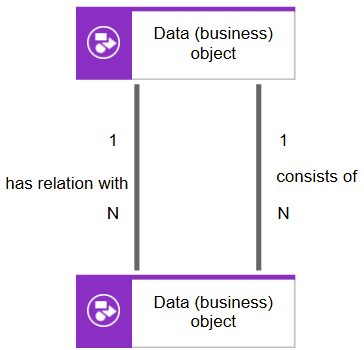
ASSIGNMENT CONVENTIONS:
No assignments are permitted for these elements.
OBJECTS/SYMBOLS CONVENTIONS:
 |
equal to BPMN symbol: 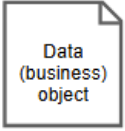 |
Business Object |
|
Object attributes (next to "Name"):
Assignments:
Occurrence copies:
|
Represents a Business Object, an information used or produced in the process (e.g., “Application”, “Invoice”). The Business Object is mapped to a task either via "is input for" or as "has as output" connection. | |
Document library - Modeling conventions
Definition
The Document library model serves as a central repository for defining and managing all business-relevant and especially process-relevant document types used across the organization.
It provides a structured overview of documents, including their relationships, versions, and lifecycle states (e.g., draft, approved, archived).
Within this model, documents can be linked to related business objects to ensure consistency and traceability across the business architecture.
All document references used in process models should originate from this library to maintain governance and avoid redundancy.
USED MODEL TYPE:
- Information carrier diagram (original name)
MODEL ATTRIBUTES (next to "Name"):
- Description
- Person Responsible
system maintained (read-only):
- Type: Information carrier diagram
- Last change: [Timestamp]
- Last user: [User name]
- Creator: [User name]
- Time of generation: [Timestamp]
MODELING CONVENTIONS:
No relationships or connectors are allowed within this model.
The Document library serves purely as a structured list of document definitions.
Documents may optionally be organized alphabetically or grouped by business domain for better readability.

ASSIGNMENT CONVENTIONS:
No assignments are allowed for documents.
OBJECTS/SYMBOLS CONVENTIONS:
 |
Document |
|
Object attributes (next to "Name"):
The linkage of physical document file (e.g., PDFs, Word or Excel files) Either file stored on "ARIS Document Storage":
Or another/external system:
Assignments:
Occurrence copies:
|


Metrics library - Modeling conventions
Definition
The Metric (KPI) library model serves as a centralized repository for defining all key performance indicators (KPIs) and metrics used across the organization.
Each element within this model represents a distinct KPI definition, describing its purpose, calculation logic, measurement unit, type, and applicable scope.
The model focuses purely on the definition and structure of metrics — not on actual values or performance results.
No relationships or connectors are created between elements; the model functions as a structured list of independent KPI definitions.
USED MODEL TYPE:
- KPI tree (original name)
MODEL ATTRIBUTES (next to "Name"):
- Description
- Person Responsible
system maintained (read-only):
- Type: KPI tree
- Last change: [Timestamp]
- Last user: [User name]
- Creator: [User name]
- Time of generation: [Timestamp]
MODELING CONVENTIONS:
No relationships or connectors are allowed within this model.
The Metrics library serves purely as a structured list of metric definitions.
Metrics may optionally be organized alphabetically or grouped by business domain for better readability.

ASSIGNMENT CONVENTIONS:
No assignments are allowed for metrics.
OBJECTS/SYMBOLS CONVENTIONS:
 |
Metric |
|
|
Object attributes (next to "Name"):
Assignments:
Occurrence copies:
|
||
Risk library - Modeling conventions
Definition
Risk library is a structured repository of risks associated with business processes, organized to support risk identification, assessment, and mitigation.
This package comes with a template.
This template provides a standardized structure for documenting and visualizing risks in BPM projects. It supports consistent risk identification, classification, and communication across teams and initiatives.
The model is available in two variants:
- Main categories and Subcategories
This variant reflects the hierarchical structure of the risk catalog, organized into:- Level 1: Main risk categories
- Level 2: Subcategories
It helps teams classify risks systematically and align them with process-related contexts.
- Cross-cutting risk topics
This variant highlights overarching risk management areas such as Business Continuity Management (BCM), Compliance, Internal Controls, Reputation Management, and others. These topics span multiple categories and support integrated governance and mitigation strategies.
If needed, both variants can be combined to provide a comprehensive view of risks and their interdependencies.
Depending on the selected variant, the group structure within the ARIS repository should be adapted accordingly to ensure clarity, consistency, and reusability across projects.
USED MODEL TYPE:
- Risk diagram (origninal name)
MODEL ATTRIBUTES (next to "Name"):
- Description
- Person Responsible
system maintained (read-only):
- Type: Risk diagram
- Last change: [Timestamp]
- Last user: [User name]
- Creator: [User name]
- Time of generation: [Timestamp]
MODELING CONVENTIONS:
The Risk library is structured using a two-level modeling approach to ensure clarity, scalability, and consistency in risk documentation across BPM initiatives.
- Level 1 – Risk catalog overview
- This model provides a high-level view of risk categories and can be created in one of two alternative formats:
- Main categories and Subcategories
- Cross-cutting risk topics
- Only the object type “Risk category” is used at this level. No individual risks are modeled here.
- Level 2 – Risk category detail model
- Each lowest-level Risk category in the overview model is linked to a dedicated Level 2 model.
- In this detailed model:
- The selected Risk category is reused as the top-level root object.
- All relevant individual risks are modeled beneath it using the object type “Risk”.
This structure supports a modular and reusable risk catalog that can be easily navigated and maintained within the ARIS repository.
Please note:
If Risiko Management is not an primary topic at the beginning, then is could make sense to start and work only with one flat level at the beginning. Here you can describe the complete tree from the top (Main risk category) to the bottom (Specific risk) in one model. At a later point in time you can switch to a two-level approach...

ASSIGNMENT CONVENTIONS:
By default, this structure is modeled in a two-level approach. The assigned level 2 model has the same model type again.
If Risiko Management is not an primary topic at the beginning and you have only a small numer of Risks, then you can avoid an assignment level and model everything in a one-level approach.
OBJECTS/SYMBOLS CONVENTIONS:
 |
Risk Category |
|
|
Object attributes (next to "Name"):
Assignments:
Occurrence copies:
|
A Risk Category represents a logical grouping of related risks within the organization. It provides a structured classification framework to organize and manage risks according to their nature, source, or impact area. Risk categories can be organized hierarchically — typically with a main category and one or more sub-categories — to support consistent risk identification, assessment, and reporting across the enterprise. |
|
 |
Risk |
|
|
Object attributes (next to "Name"):
Assignments:
Occurrence copies:
|
A Risk represents a potential event or condition that, if it occurs, may have a positive or negative impact on business objectives, processes, or assets. Each risk is typically classified under a specific risk category and described by its cause, potential impact, likelihood, and mitigation measures. However, these conventions cover only the Risk idenfication (and not assessment, mitigation, etc.) Within the Risk library model, risks serve as standardized definitions that can later be linked to processes, organizational units, or other business objects for assessment and monitoring. |
|
Roles library - Modeling conventions
Definition
The "Role Library" is used to model and visualize the roles involved in business processes, independent of their organizational assignment. It focuses on the functional responsibilities within a process or scenario, rather than the hierarchical structure of the organization.
This model type is particularly useful for clarifying who is responsible for specific tasks or decisions.Additionally, it supporting the process design and access control.
Key characteristics:
- Roles are modeled as standalone objects and can be reused in multiple process models.
- It serves as a reference model for assigning roles in BPMN process diagrams and other views.
In best practice, roles defined in the Role Diagram should be reused as occurrence copies in BPMN models and organizational views to ensure consistency across the repository.
USED MODEL TYPE:
- Role diagram (original name)
MODEL ATTRIBUTES (next to "Name"):
- Description
- Person Responsible
system maintained (read-only):
- Type: Role diagram
- Last change: [Timestamp]
- Last user: [User name]
- Creator: [User name]
- Time of generation: [Timestamp]
MODELING CONVENTIONS:
It's simple list of "Role" objects without any connections or other conventions.
It is strongly recommended to organize the "Role Library" using a folder structure based on business areas or departments. This is important because, in the second step of the modeling process, the list of roles must come from these different departments. Ultimately, this is a matter of ownership: each department is responsible for maintaining its own list of roles. In each folder, a separate Role diagram is maintained. Furthermore, access rights for creating, editing, and deleting roles are managed through the folder settings.

ASSIGNMENT CONVENTIONS:
By default, this structure is modeled as a flat, single-level hierarchy without additional assignments
OBJECTS/SYMBOLS CONVENTIONS:
 |
Role |
|
|
Object attributes (next to "Name"):
Assignments:
Occurrence copies:
|
Represents a defined role within a process or organizational context, specifying responsibilities and permissions associated with tasks or process activities. | |
Organizational structure - Modeling conventions
Definition
The "Organizational Structure" model represents the hierarchy of organizational units and their assigned roles within the business context. It provides a clear overview of reporting lines and responsibilities.
This model can be created manually during early modeling phases or imported via interfaces from HR systems to ensure consistency and reduce maintenance effort.
To maintain alignment with process modeling the "Role" objects in the "Organizational Structure" should ideally be occurrence copies of the roles used in BPMN process models, ensuring semantic consistency across views.
USED MODEL TYPE:
- Organizational chart (original name)
MODEL ATTRIBUTES (next to "Name"):
- Description
- Person Responsible
system maintained (read-only):
- Type: Organizational chart
- Last change: [Timestamp]
- Last user: [User name]
- Creator: [User name]
- Time of generation: [Timestamp]
MODELING CONVENTIONS:
The Organizational structure model represents the hierarchical setup of organizational units relevant to the modeling context. It follows a simple and pragmatic convention, especially suitable for early-stage modeling.
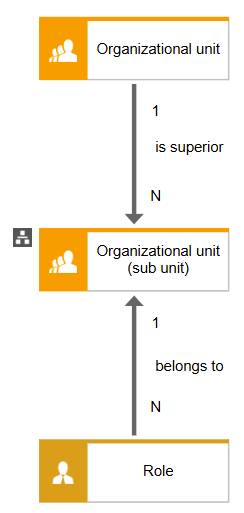
By default, this structure is modeled as a flat, single-level hierarchy without additional assignments or complexity. For these straightforward cases, a tree diagram is recommended, using the following rules:
- A "Role" object is always connected to an "Organizational unit" object.
- Each "Role" is linked to exactly one "Organizational unit".
- "Organizational Units" can be connected to other "Organizational units" to represent the enterprise hierarchy in a tree structure.
This approach ensures clarity, consistency, and ease of maintenance, especially in the initial phases of organizational modeling.
To improve readability in the case of larger models: It is recommended to break down the org chart into multiple levels. For this purpose, the organizational units should be linked to the same model type, OrgChart, and further modeled there. It is crucial, however, that the lowest node—the organizational unit receiving the linkage—then also serves as the starting node in the new model.
ASSIGNMENT CONVENTIONS:
By default, this structure is modeled as a flat, single-level hierarchy without additional assignments.
However, in case of larger models, it is recommenced to break down the org charts into multiple levels. Therefore, the same model type needs to be reused.
OBJECTS/SYMBOLS CONVENTIONS:
 |
Organizational unit |
|
|
Object attributes (next to "Name"):
Assignments:
Occurrence copies:
|
Represents a structural element of an organization, used exclusively within an organizational chart. Organization Units can be nested to reflect hierarchical relationships and reporting lines within the organization. | |
 |
Role | |
|
Object attributes (next to "Name"):
Assignments:
Occurrence copies:
|
Represents a defined role within a process or organizational context, specifying responsibilities and permissions associated with tasks or process activities. | |
Need Help?
If you have questions about any Accelerator or want to exchange experiences with others, visit our community forum. There you can ask questions, share insights, and support each other.