
v1.x.y
Modeling Conventions and Guidelines
- General Modeling Conventions, Guidelines, and Fundamentals
- Process Architecture & Process Modeling
- Process Architecture — Leveling conventions at a glance (jump to section)
- Modeling Principles for Process models (jump to section)
- Level 1 — Modeling conventions (jump to section)
- Level 2 — Modeling conventions (jump to section)
- Level 3 — Modeling conventions (jump to section)
- Process (BPMN) — Modeling conventions (jump to section)
- Subprocess ("Detailed" BPMN)— Modeling conventions (jump to section)
- End-to-End Level 1— Modeling conventions (jump to section)
- End-to-End Level 2— Modeling conventions (jump to section)
- Horizontal BPMN Linking Aligned to End-to-End — Modeling conventions (jump to section)
- Library Modeling
- Group and Assignment structure
- Semantic Checks
Process architecture — Leveling conventions at a glance
Two Complementary Perspectives in the Process Architecture
The Process Architecture is built around two complementary perspectives that offer different but connected views of your business processes:
I. Process Landscape
- Functional and organizational view of all business processes
- Structured by business domains or capabilities
- Synonyms: Business Function View, Process Portfolio, etc.
- Focus: What processes exist in the organization
The Process Landscape is a taxonomy with a tree structure spanning three levels, where each "Process" (L3) is assigned to exactly one position — a VERTICAL classification.
II. End-to-End Business Scenarios
- Cross-functional process chains (e.g. Order-to-Cash, Hire-to-Retire)
- Designed to illustrate how value flows across departments
- Synonyms: Value Streams, E2E Processes, etc.
- Focus: How processes deliver value across the organization
End-to-End Business Scenarios are a sequence of Processes (from the L3 Process Landscape, arranged as a HORIZONTAL chain.
Highly Recommended Starting Point: Process Landscape as Leading Perspective
To ensure a structured and scalable approach, it is highly recommended to define the Process Landscape as the leading perspective and first milestone when setting up your Process Architecture.
Start by creating a top-down functional and organizational process structure, aligned with business domains and responsibilities. This provides a stable foundation for modeling and helps ensure consistency across all subsequent process levels and views.

Modeling Principles for Process models
These are the general conventions for creating and linking models within the ARIS Project Database.
Central Entry Model
The central, overarching model for entering the modeling space is the “Process landscape” model, which already exists in the Template Database. It serves as the official starting point for all new modeling activities of the process architecture.
The Process landscape includes the three recommended Level-1 objects (process categories):
- Management processes
- Core processes
- Support processes
Start point of the process architecture
All modeling of the process models follows a top-down approach and starts in generally with Process landscape and continue step by step into more detailed levels.
The overall process architecture with the detailed structure of these levels is defined in the separate convention model Process architecture, which provides an overview of the hierarchical modeling levels used within the ONE Standard environment.
Creation of New Process Models
Modeling is always based on an object-driven approach.
New models must be created from existing objects by using the assignment function, which automatically places the new model one level below its parent model.
During this step, the modeler must select the appropriate model type for the new model and choice or even create the new group location.
The structure and level-specific model types are defined in the Process architecture model, which provides detailed guidance on the correct model selection for each hierarchy level.
Before creating a new model, the relevant attributes of the object must be properly maintained, including the process name, description, responsible role, and process category.
All new models are created exclusively via the assignment mechanism within ARIS.
Assignment rule: Object-to-Model Relationship
Between each superior object — (object type: Function) — and its assigned model, there must always be a one-to-one relationship.
This means that a single object may not have multiple models assigned to it.
(An exception exists for Function Allocation Diagrams (FADs), but these are typically not relevant for regular modelers and should not be used unless explicitly required.)
Details here:
This ensures that each model remains correctly linked to its parent object, preserving the hierarchical structure and preventing any disconnected or misplaced models within the database.
Use of Library Elements
When creating process models, modelers must make use of the existing library elements that contain the reusable business artifacts — such as applications, business objects, documents, metrics, risks, and roles.
These elements should be used as occurrence copies of the maintained library artifacts to ensure consistency and traceability across the process repository.
In practice:
It is very likely that certain library elements are missing or not yet fully defined.
In such cases, modelers should create new objects directly within the process model to continue the modeling work without interruption.
However, it must be ensured that the Person Responsible for the respective library domain is informed about the new elements so that they can review, approve, and properly integrate them into the official library models.
No Occurrence Copies of Functions
Furthermore, no occurrence copies of process objects (Functions) across the same level should be created.
Each function must exist as a unique definition object within the process architecture to ensure clear ownership, unambiguous relationships, and consistent model governance.
The only exception is the “Process” object, where re-use is explicitly intended for building the End-to-end business scenarios.
Person Responsible
The Person Responsible attribute must be maintained for all models, whether part of the process architecture or the library.
It defines the organizational ownership for maintaining and governing the respective model.
While it may remain unassigned during initial design phases, it must be clearly defined before the model is published or set live — ideally already at the start of modeling.
The Person Responsible typically changes from level to level as the model hierarchy becomes more detailed, reflecting the shift of accountability to the respective process or domain owner at each level.
Semantic Check
For all models, a dedicated semantic check named “Model and Convention Validation (ONE Standard)” is available. Modelers are required to execute this check to verify compliance with all defined conventions and modeling rules. The semantic check validates the correct maintenance of relevant attributes, the structural integrity of models, and the proper placement of all elements within the database. Running this check regularly ensures that every model complies with the ONE Standard conventions before being released or published.
Level 1 (Process landscape) — Modeling conventions
Definition
The top-level entry point into the process architecture which is often called "Enterprise Process Map". It provides a high-level overview of the entire process landscape, typically structured into Management, Core, and Support process categories.
Purpose:
To give all stakeholders a quick and intuitive orientation across the organization’s process world.
Typical Content:
- Visual map of Process categories and the Process areas
- Navigation entry to deeper levels
- Often used in dashboards or portals
USED MODEL TYPE:
- Value-added chain diagram
MODEL ATTRIBUTES (next to "Name"):
- Description
- Person Responsible
- Level (Process landscape): Level 1
system maintained (read-only):
- Type: Value-added chain diagram
- Last change: [Timestamp]
- Last user: [User name]
- Creator: [User name]
- Time of generation: [Timestamp]
MODELING CONVENTIONS:
The "Enterprise Process Map" typically consists of several "Process categories". Each "Process category" has multiple "Process areas" included

ASSIGNMENT CONVENTIONS:
- "Process category" objects don't have an assignment to a deeper level.
- "Process area" objects have exactly one assignment to next deeper level which is a "Level 2" Value-added chain diagram.
OBJECTS/SYMBOL CONVENTIONS:
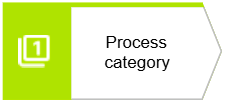 |
Process category |
|
Object attributes (next to "Name"):
Further business information (in 'Properties')
Assignments:
Occurrence copies:
|
|
 |
Process area |
|
Object attributes (next to "Name"):
Further business information (in 'Properties')
Assignments:
Occurrence copies:
|
Level 2 (Process area) — Modeling conventions
Definition
A "Process Area" is a functional cluster of related processes within a category. It is typically aligned with business domains, departments, or capabilities.
Purpose:
To reflect organizational responsibilities and provide a manageable grouping of processes for ownership, governance, and modeling.
Examples:
- Sales & Customer Management
- Procurement
- Finance & Controlling
USED MODEL TYPE:
- Value-added chain diagram
MODEL ATTRIBUTES (next to "Name"):
- Description
- Person Responsible
- Level (Process landscape): Level 2
system maintained (read-only):
- Type: Value-added chain diagram
- Last change: [Timestamp]
- Last user: [User name]
- Creator: [User name]
- Time of generation: [Timestamp]
MODELING CONVENTIONS:
Each Level 2 model (of the Process landscape) describes the "Process area" in detail.
It is required that the "Process area" object of the superior Level 1 model is reused via occurrence copy.
Each Level 2 model has exactly one "Process area" object. However, each "Process area" object has multiple "Process group" objects embedded.

ASSIGNMENT CONVENTIONS:
"Process area" don't need a further assignment to a deeper level because they have already one. "Process chain" objects have exactly one assignment to next deeper level which is a "Level 3" Value-added chain diagram.
OBJECTS/SYMBOL CONVENTIONS:
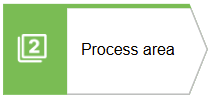 |
Process area |
|
REUSED Occurrence copy from the superior Level 1 model (Process Landscape). See details there.Only one Process area allowed per model.
|
|
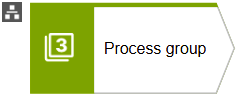 |
Process group |
|
Object attributes (next to "Name"):
Further business information (in 'Properties')
Assignments:
Occurrence copies:
|
Level 3 (Process Group) — Modeling conventions
Definition:
A "Process group" is a logical sequence of related processes within a "Process area". It represents the functional flow of activities that belong to a specific business domain, but does not cross organizational boundaries like End-to-End Scenarios do.
Purpose:
To describe the internal process flow within a department or function, serving as a bridge to detailed process modeling.
USED MODEL TYPE:
- Value-added chain diagram
MODEL ATTRIBUTES (next to "Name"):
- Description
- Person Responsible
- Level (Process landscape): Level 3
system maintained (read-only):
- Type: Value-added chain diagram
- Last change: [Timestamp]
- Last user: [User name]
- Creator: [User name]
- Time of generation: [Timestamp]
MODELING CONVENTIONS:
Each Level 3 model describes the "Process group" in detail.
It is required that the "Process group" object of the superior Level 2 model is reused via occurrence copy.
Each Level 3 model has exactly one "Process group" object. However, each "Process group" object has multiple "Process" objects embedded.

ASSIGNMENT CONVENTIONS:
"Process group" don't need a further assignment to a deeper level because they have already one. "Process" objects have exactly one assignment to next deeper level which is a process flow description as "Enterprise BPMN collaboration diagram".
OBJECTS/SYMBOLS CONVENTIONS:
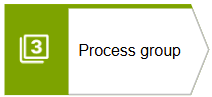 |
Process group |
|
REUSED Occurrence copy from the superior Level 2 model (Process arrea). See details there. Only one Process group allowed per model.
|
|
 |
Process (sometimes also called "Value-added chain") |
|
Object attributes (next to "Name"):
Further business information (in 'Properties')
Assignments:
Occurrence copies:
|
Process (BPMN) — Modeling conventions
Definition
A "Process" is the lowest mandatory level in the functional process landscape and is the most important one. It represents a detailed, executable business activity. It is modeled using BPMN (Business Process Model and Notation) and describes the exact flow of tasks, decisions, roles, systems, busines objects, documents and other aspects involved in performing a business operation.
- Operational Clarity: Provides a precise and standardized representation of how a process is executed.
- Process Controls: Embeds control points, approvals, and validations directly into the process flow.
- Compliance & Auditability: Ensures that regulatory, legal, and internal compliance requirements are transparently documented and traceable.
- Automation Readiness: Serves as a blueprint for workflow automation or system integration.
- Training & Onboarding: Acts as a reference for new employees and process participants.
In the context of the Process Landscape perspective, this model can be seen as Level 4 hierachy. However, some processes are also important from a value stream perspective and thus are included in one or several End-to-End Business Scenarios.
USED MODEL TYPE:
- Enterprise BPMN Collaboration diagram
MODEL ATTRIBUTES (next to "Name"):
- Description
- Person Responsible
system maintained (read-only):
- Type: Enterprise BPMN Collaboration diagram
- Last change: [Timestamp]
- Last user: [User name]
- Creator: [User name]
- Time of generation: [Timestamp]
MODELING CONVENTIONS:
The "Process" is described in the BPMN and notation and represents the standard process flow.
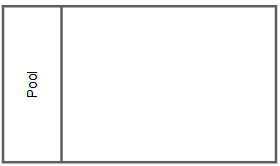
- For this kind of model type and model level, a "White-box pool" (simply called "Pool") needs to be created which has typically the name of the process. A model has exactly 1 White-box pool
- Additionally, the white-box pool has one or several "Lanes" included. All tasks are included in the Lanes.
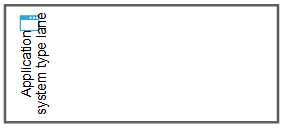
- The default Lane type is the "Role Lane". Only in case of fully-automated activities the "System-typed Lane" should be used.
OBJECTS/SYMBOLS CONVENTIONS:
 |
Pool |
|
|
Object attributes (next to "Name"):
Assignments:
Occurrence copies:
|
The "White-box pool", often simply called "Pool" shows the internal process flow of the involved participants. In business modeling, we often name the Pool after the process being described, not the participant. This helps readability and aligns with business terminology. All BPMN models on this level ("Enterprise BPMN Collaboration diagram") needs to have a "White-box Pool". |
|
 |
Role lane |
|
|
Object attributes (next to "Name"):
Assignments:
Occurrence copies:
|
In general, a Lane is a subdivision of a Pool that represents a specific role, function, or organizational unit. A role-typed Lane—which is the default and recommended type—should always be used whenever possible. It is named after a business role (e.g., “Sales Agent”, “Clerk”, “Customer Service”) to clearly indicate responsibility for the tasks within that lane. |
|
 |
Application lane |
|
|
Object attributes (next to "Name"):
Assignments:
Occurrence copies:
|
A system-typed Lane is another type of lane that should be used only in exceptional cases to indicate that the assigned tasks are fully automated and executed by the represented system without human involvement.
|
|
 |
User taskA task performed by a person with system support, e.g., via a user interface or workflow tool. Must only be occured in a "Role Lane". |
FOR ALL TASKS:
Object attributes (next to "Name"):
Further business information (in 'Properties')
Note:
Assignments:
Occurrence copies:
|
 |
Manual taskA task performed without system support, e.g., making a phone call or handling paper documents. Must only be occured in a "Role Lane". |
|
 |
Service taskAn automated task, typically executed by a system. Must only be occured in a "System-typed Lane". |
|
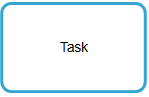 |
Abstract taskThis is an Abstract Task, representing a single activity typically described using a verb–noun combination (e.g., “Review Invoice”, “Create Order”). |
 |
Subprocess |
|
|
Object attributes (next to "Name"):
Assignments:
Occurrence copies:
|
A Subprocess is a BPMN activity that represents a "Subprocess" model that lists a group of tasks. It is the only BPMN element that allows the assignment of an optional Level 5 model, providing a deeper layer of detail when needed. It's recommend to keep it collapsed and never expand it, and to use the assignment navigation. |
|
 |
(General) Start eventMarks the beginning of a process; it triggers the process flow. |
FOR ALL EVENTS:
Object attributes (next to "Name"):
Assignments:
Occurrence copies:
|
 |
Message Start eventA start event that is triggered when a specific message is received from an participant. |
|
 |
Timer Start eventA start event that triggers the process based on a defined time or schedule. |
|
 |
(General) Intermediate eventRepresents something that happens between the start and end of a process, affecting the normal flow. |
|
 |
Intermediate message event (catch)Waits for and captures an incoming message during the process execution. |
|
 |
Intermediate message event (throw)Sends out a message to another participant during process execution. |
|
 |
Intermediate timer eventDelays or triggers process flow based on a defined time or duration during execution. |
|
 |
(General) End eventMarks the end of a process path; it indicates that the process has been completed. |
|
 |
Message end eventAn end event that sends a message when the process or path completes. |
|
 |
Terminated End eventEnds all activities in the process immediately, regardless of their current state. |
 |
Exclusive gatewayA decision point where only one path is taken based on conditions (e.g., “yes” or “no”) |
FOR ALL GATEWAYS:
|
 |
Inclusive gatewayOne or more paths may be taken depending on the conditions.All matching paths are followed. |
|
 |
Parallel gatewayAll outgoing paths are taken simultaneously. Used to model parallel activities. |
 |
Data (business) object |
|
|
Object attributes (next to "Name"):
Assignments:
Occurrence copies:
|
Represents a Business Object, an information used or produced in the process (e.g., “Application”, “Invoice”). The Business Object is mapped to a task either via "is input for" or as "has as output" connection. | |
 |
Black-box pool |
|
|
Object attributes (next to "Name"):
Assignments:
Occurrence copies:
|
A "Black-box Pool" is also a "Pool" object but visualized in another way. It is an optional element. It represents an interfacing process or participant whose internal process flow is not modeled in the current diagram. It is used to show interactions (via message flows) between the white-box pool and this black-box pool. In business modeling, is typically used for: External participants (e.g., customers, suppliers, systems) and/or external processes. |
|
 |
Message |
|
|
Object attributes (next to "Name"):
Assignments:
Occurrence copies:
|
Message: An object representing information or data exchanged between two process participants via a Message Flow. It defines the content of a message sent or received but does not itself trigger any activities. | |
ASSIGNMENT CONVENTIONS:
It is possible to assign another, optional process flow level. In this case, the "Subprocess" symbol needs to used in this level. Then the "Enterprise BPMN Process diagram" can be used.
Subprocess ("Detailed" BPMN)— Modeling conventions
Definition
This BPMN model represents a Level 5 "Subprocess", which provides a detailed breakdown of a subprocess element defined in the higher-level Level 4 BPMN model. The Level 4 model outlines the business process at a consolidated level, while this Level 5 model elaborates on the internal logic and flow of a specific subprocess.
The Level 5 model is optional and only exists if the corresponding "Subprocess" symbol is explicitly used in the Level 4 model. It serves to provide a deeper understanding of the subprocess logic.
Characteristics
- Scope: Focused solely on the logic encapsulated within the referenced subprocess.
- Granularity: More detailed than Level 4, often including technical steps, decision logic, or exception handling.
- Traceability: Maintains a clear reference to the parent subprocess in Level 4 to ensure architectural consistency.
- Optionality: The utilization of this Level 5 model is more exceptional and should be applied more sparingly, only when additional detail provides clear value or is required for specific use cases.
USED MODEL TYPE:
- Enterprise BPMN Process diagram
MODEL ATTRIBUTES (next to "Name"):
- Description
- Person Responsible
system maintained (read-only):
- Type: Enterprise BPMN Process diagram
- Last change: [Timestamp]
- Last user: [User name]
- Creator: [User name]
- Time of generation: [Timestamp]
MODELING CONVENTIONS:
The "Subprocess" is described in the BPMN and notation and represents the standard process flow. In the context of the Process Landscape perspective, this model can be seen as Level 5 hierarchy.
Don't use this Level 4 models directly for the creation of "End-To-End Business Scenarios".
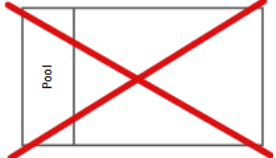
For this kind of model and model level, no pool and no lane objects can be used.
OBJECTS/SYMBOLS CONVENTIONS:
|
User taskA task performed by a person with system support, e.g., via a user interface or workflow tool. Must only be occured in a "Role Lane". |
FOR ALL TASKS:
Object attributes (next to "Name"):
Further business information (in 'Properties')
Note:
Assignments:
Occurrence copies:
|
|
Manual taskA task performed without system support, e.g., making a phone call or handling paper documents. Must only be occured in a "Role Lane". |
|
|
Service taskAn automated task, typically executed by a system. Must only be occured in a "System-typed Lane". |
|
|
Abstract taskThis is an Abstract Task, representing a single activity typically described using a verb–noun combination (e.g., “Review Invoice”, “Create Order”). |
|
(General) Start eventMarks the beginning of a process; it triggers the process flow. |
FOR ALL EVENTS:
Object attributes (next to "Name"):
Assignments:
Occurrence copies:
|
|
Message Start eventA start event that is triggered when a specific message is received from an participant. |
|
|
Timer Start eventA start event that triggers the process based on a defined time or schedule. |
|
|
(General) Intermediate eventRepresents something that happens between the start and end of a process, affecting the normal flow. |
|
|
Intermediate message event (catch)Waits for and captures an incoming message during the process execution. |
|
|
Intermediate message event (throw)Sends out a message to another participant during process execution. |
|
|
Intermediate timer eventDelays or triggers process flow based on a defined time or duration during execution. |
|
|
(General) End eventMarks the end of a process path; it indicates that the process has been completed. |
|
|
Message end eventAn end event that sends a message when the process or path completes. |
|
|
Terminated End eventEnds all activities in the process immediately, regardless of their current state. |
|
Exclusive gatewayA decision point where only one path is taken based on conditions (e.g., “yes” or “no”) |
FOR ALL GATEWAYS:
|
|
Inclusive gatewayOne or more paths may be taken depending on the conditions.All matching paths are followed. |
|
|
Parallel gatewayAll outgoing paths are taken simultaneously. Used to model parallel activities. |
|
Data (business) object |
|
|
Object attributes (next to "Name"):
Assignments:
Occurrence copies:
|
Represents a Business Object, an information used or produced in the process (e.g., “Application”, “Invoice”). The Business Object is mapped to a task either via "is input for" or as "has as output" connection. | |
 |
NOT ALLOWED |
 |
NOT ALLOWED |
|
 |
NOT ALLOWED |
 |
NOT ALLOWED |
|
 |
NOT ALLOWED |
 |
NOT ALLOWED |
ASSIGNMENT CONVENTIONS:
No "subprocesses" objects and thus no assignments are allowed!
End-to-End Level 1— Modeling conventions
The "End-to-end business scenarios map" is a list of "End-to-end business scenarios" which are:
- Cross-functional process chains (e.g. Order-to-Cash, Hire-to-Retire)
- Designed to illustrate how value flows across departments
- Synonyms: Value Streams, E2E Processes, etc.
- Focus: How processes deliver value across the organization
It is strongly recommended to start with Process Landscape decomposition before the creation of "End-to-end business scenarios" should be started. This ensures a structured and scalable approach.
USED MODEL TYPE:
- End-to-End business scenario diagram
MODEL ATTRIBUTES (next to "Name"):
- Description
- Person Responsible
- Level (E2E Business Scenario): Level 1
system maintained (read-only):
- Type: End-to-End business scenario diagram
- Last change: [Timestamp]
- Last user: [User name]
- Creator: [User name]
- Time of generation: [Timestamp]
MODELING CONVENTIONS:
The "End-to-end business scenario map" is a flat list of existing "End-to-end business scenarios". It is optional structure it visually to individual purposes.

ASSIGNMENT CONVENTIONS:
Each "E2E business scenario" object should have exactly one Level 2 model assigned. The model type for this level 2 model is a Value-added chain diagram.
OBJECTS/SYMBOL CONVENTIONS:
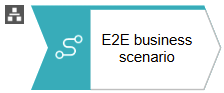 |
E2E business scenario |
|
Object attributes (next to "Name"):
Further business information (in 'Properties')
Occurrence copies:
|
End-to-End Level 2— Modeling conventions
Visualizing the Value Stream through Process Integration
The "End-to-End Business Scenario" model represents a high-level view of a business value stream. It connects individual Process objects—previously defined in the Process Landscape—and arranges them in a logical sequence to reflect the flow of value across organizational units or systems.
Each "Process" in this model serves as a placeholder for more detailed process logic, which is modeled one level deeper using BPMN notation. This layered approach ensures clarity and consistency: the Level 2 model provides a strategic overview, while the BPMN models deliver operational detail.
Key characteristics:
- Typically, all "Processes" are copied out of different "Process Landscape" areas/models.
- Focus on value creation across the entire scenario.
- Reuse of Process objects via occurrence copies to ensure consistency.
- Logical sequencing of processes using the connection type "is predecessor of".
- Linkage to BPMN models for detailed process execution logic.
This model is essential for aligning business strategy with operational execution and serves as a bridge between high-level business architecture and detailed process design.
USED MODEL TYPE:
- End-to-End business scenario diagram
MODEL ATTRIBUTES (next to "Name"):
- Description
- Person Responsible
- Level (E2E Business Scenario): Level 2
system maintained (read-only):
- Type: End-to-End business scenario diagram
- Last change: [Timestamp]
- Last user: [User name]
- Creator: [User name]
- Time of generation: [Timestamp]
MODELING CONVENTIONS:
"Process" objects must only be used at the appropriate level of granularity. It is strongly recommended to begin with process decomposition in the Process Landscape view, where processes are identified and assigned to the correct level (typically mapped to Process Chains).
These defined "Process" objects can then be reused in End-to-End Business Scenario models (Level 2) by inserting them as occurrence copies.
Additionally—and very importantly—the "Process" objects must be arranged in a logical sequence using the connection type "is predecessor of" to clearly define their execution order.
Finally, this re-usage approach leads to the benefit that the already existing BPMN (Level 4) models are brought into these end-to-end perspective.

ASSIGNMENT CONVENTIONS:
Each "Process" needs to have exactly one BPMN (Level 4) model assigned. (Model type: Enterprise BPMN collaboration diagram).
Attention: Don't use the "Enterprise BPMN process diagram" here.
Due to the fact that we reuse the "Process" from the Process Landscape, the BPMN (Level 4) should typically exist already.
Pls note: It is not usual that an assigned BPMN (Level 4) needs to be slightly adjusted, so that the process interfaces of the end-to-end business scenario are met.
OBJECTS/SYMBOL CONVENTIONS:
|
Occurrence copies:
The processes contained within each End-to-End Business Scenario are occurrence copies of the corresponding processes defined in the Process Landscape. |
|
 |
Process |
|
Object attributes (next to "Name"):
Further business information (in 'Properties')
Assignments:
|
|
Horizontal BPMN Linking Aligned to End-to-End — Modeling conventions
Introduction
Horizontal BPMN linking ensures that process continuity defined on Level 2 of the End-to-End Business Scenario is consistently reflected inside the underlying BPMN models.
This mechanism enables modelers to navigate across BPMN diagrams, maintain semantic consistency, and ensure that End Events and Start Events correctly represent the overall business process flow.
End-to-End Alignment Logic
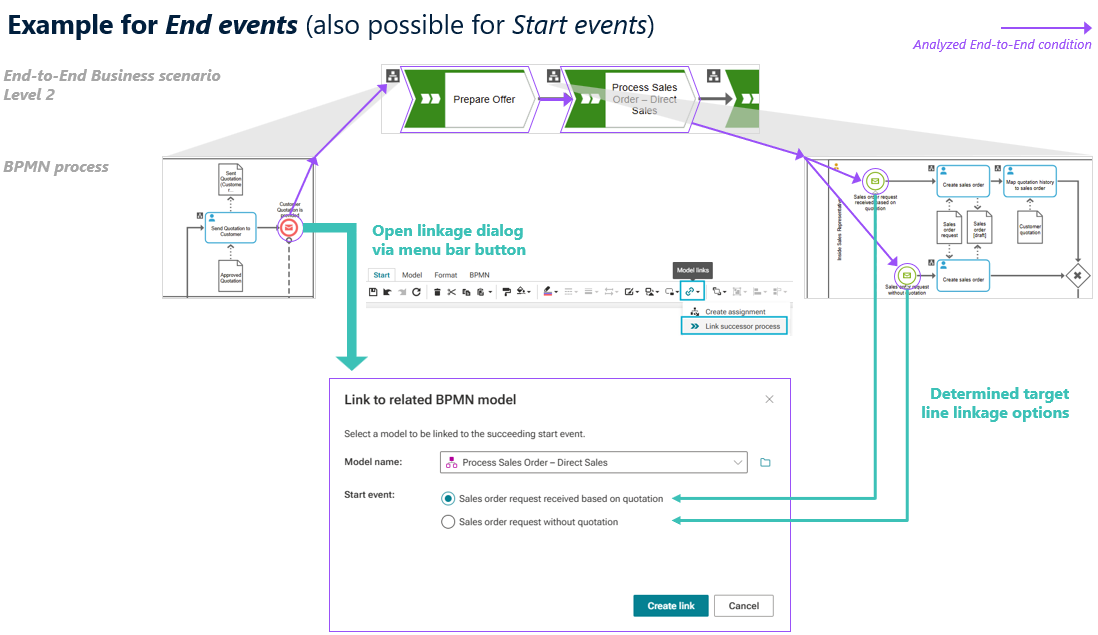
Horizontal BPMN linking creates the technical connection between the End Event of a predecessor BPMN model and the Start Event of its successor.
The available link options are not chosen manually.
The BPMN Link Modeler analyzes the End-to-End Level 2 scenario, identifies the valid successor process and its Start Events, and presents only those options that are logically possible according to the defined E2E flow.
How to Create the Link
From the predecessor BPMN model
- Select the relevant End Event in the BPMN model.
- In the Start tab on the menu bar, open the Model links and choose Link predecessor process.
- A dialog opens showing all valid successor BPMN models based on the End-to-End Level 2 flow. Select the appropriate successor model. In many cases, only a single model is available.
- The BPMN Link Modeler then displays all valid Start Events of the selected successor model that can be linked to the selected End Event.
- Select the appropriate Start Event(s) and choose Create Link to establish the connection.
Horizontal linking can also be defined from the successor side. By selecting a Start Event, the dialog shows the corresponding predecessor End Event(s) from which the Start Event can be linked. Any changes made here are reflected on both sides
Best Practices
- Create horizontal links after the Level 2 scenario flow is finalized.
- Use clear, specific event names to improve link selection.
- Review both predecessor and successor models to maintain consistency.
Need Help?
If you have questions about any Accelerator or want to exchange experiences with others, visit our community forum. There you can ask questions, share insights, and support each other.